










-44%

Microsoft Windows 10 Enterprise
Original price was: $19.99.$11.99Current price is: $11.99.
PROJECT PROFESSIONAL 2021 ACTIVATION KEY – (PC)
Original price was: $19.99.$12.49Current price is: $12.49.
Microsoft Project 2019 Professional
Original price was: $17.99.$9.99Current price is: $9.99.
Microsoft project 2019 Pro Plus 2019
original key
Fast delivery in your Email

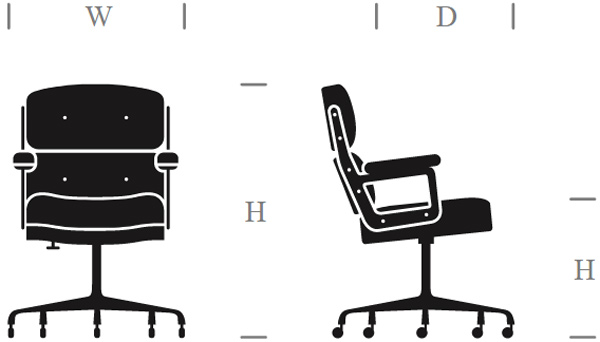
Size and packaging guidelines

Fermentum scelerisque hendrerit parturient nullam enim lobortis litora parturient dictumst.

Potenti a quisque tincidunt venenatis adipiscing parturient fermentum nisl tincidunt amentu.

Scelerisque conubia lobortis a condimentum ad eleifend dui integer maecenas habitant nostra.
| Specification | Chair | Armchair | Sofas |
| Height | 37" | 42" | 42" |
| Width | 26.5" | 32.5" | 142" |
| Depth | 19.5" | 22.5" | 24.5" |
| Assembly Required | No | No | Yes |
| Packaging Type | Box | Box | Box |
| Package Weight | 55 lbs. | 64 lbs. | 180 lbs. |
| Packaging Dimensions | 27" x 26" x 39" | 45" x 35" x 24" | 46" x 142" x 25" |
Description
Microsoft Project 2019 Professional
Microsoft Project Professional 2019 is a professional business tool that helps create business projects in collaboration with others. It comprises all Project Standard features, and also resource management, collaboration tools, time-sheets, SharePoint task sync, etc. If you’ve never used Microsoft Project before, there is the ‘getting started’ screen that shall help you learn quickly new features so that you start right and make good use of what the tool offers. The automated scheduling applications help bring down training time and inefficiencies. Also, you could create multiple timelines that make visualizing complex schedules easier.
The resource management software tools would help with building project teams, creating more efficient schedules and requesting resources needed. Most importantly, the built-in reports assist you with visualizing information to gain valuable insights across projects, thereby making more information-driven decisions Project 2019 improves upon these timelines. Microsoft Project is no doubt an excellent scheduling product. Merging Project Server and Microsoft Project 2019 could enable a company to have a full-fledged project management suite that could help increase project management activities’ efficiency.
Features of Microsoft Project 2019 Professional Retail
Below are some amazing features you can experience after installation of Microsoft Project 2019 Professional Retail please keep in mind features may vary and totally depends if your system support them.
Start quickly
- Use pre-built Project templates make sure you get your projects started quickly and on the right path.
Schedule efficiently
- Familiar automated scheduling tools help reduce inefficiencies and training time. Multiple timelines make it easier to visualize complex schedules.
Manage resources effectively
- Resource management tools help you build project teams, request needed resources, and create more efficient schedules.
Make smart decisions
- Built-in reports support informed decisions by helping project stakeholders visualize data to gain insights across projects.
Fast startup
- The Getting Started screen walks you through fundamental capabilities, like linking tasks and creating a timeline, to help you get up to speed fast.
Best-in-class templates
- Use one of the many pre-built templates from within Project Professional and on comto get access to best-in-class project plans.
Intuitive search
- Use the Tell Me search bar—standard across most Office products—to quickly find useful features in Project so you can work more efficiently.
Familiar charts
- Built for professional project managers, Project Professional offers familiar tools, like Gantt charts, to help you easily create schedules and reduce training time.
Smart automation
- Reduce inefficiencies with automated features. Auto-populate start and end dates based on dependencies, and use the Task Inspector to identify more efficient task and resource arrangements.
Multiple timelines
- Built-in multiple timelines help you visually represent complex schedules and understand all aspects of a project. Easily share timelines using familiar Office tools like PowerPoint (Office, including PowerPoint, is sold separately).
Intuitive baselines
- You can use baselines to help decision makers track and compare actual progress to the original project plan.
Visualized relationships
- Task path highlighting in Gantt charts helps you understand the relationship among tasks and identify which are most critical to the project’s success.
What-if planning
- Set tasks to “inactive” and run what-if scenarios to determine the best-fit assignments without re-creating your entire project plan.
Synchronized task lists
- With task list synchronization, data will appear in Project Professional as team members update their assignments in SharePoint Server (sold separately).
Consolidated view
- Consolidate all your potential project resources in a single view so that resource managers can compare resources across standardized data to build best-fit teams.
Optimized resources
- The Resource EngagementTooltip with requirements for Resource Engagement feature lets you request specific resources. The Team Planner helps you identify and fix potential resourcing issues that could impact the schedule.
Tools for teamwork
- Use Microsoft Teams* or Skype for Business for voice, video, and chat to make collaboration easier within Project, saving you from switching between apps. *Sold separately
Connected apps
- Easily copy information from Project and paste it into familiar Office applications like PowerPoint and Word. And OneDrive for Business provides handy storage for project artifacts.
Collaborative workspaces
- Create a dedicated project site to share information—status updates, conversations, and project timelines—so team members stay informed.
Project Online Premium and Project Server sync
- Sync Project Professional 2019 schedules with Project Online Premium and Project Server 2019.
Project reports
- Powerful built-in reports, like Burndown and Resource Overview, can help you gain insights, communicate information to stakeholders, and achieve results.
System Requirements for Microsoft Project 2019 Professional Retail
Before you install Microsoft Project 2019 Professional Retail you need to know if your pc meets recommended or minimum system requirements:
- Operating System: Windows 7/8/8.1/10
- Memory (RAM): 2 GB of RAM required.
- Hard Disk Space:3 GB of free space required.
- Processor:1 GHz Intel Pentium processor or later.
Technical Specifications
Features of Microsoft Project 2019 Professional Retail
Below are some amazing features you can experience after installation of Microsoft Project 2019 Professional Retail please keep in mind features may vary and totally depends if your system support them. Start quickly
- Use pre-built Project templates make sure you get your projects started quickly and on the right path.
Schedule efficiently
- Familiar automated scheduling tools help reduce inefficiencies and training time. Multiple timelines make it easier to visualize complex schedules.
Manage resources effectively
- Resource management tools help you build project teams, request needed resources, and create more efficient schedules.
Make smart decisions
- Built-in reports support informed decisions by helping project stakeholders visualize data to gain insights across projects.
Fast startup
- The Getting Started screen walks you through fundamental capabilities, like linking tasks and creating a timeline, to help you get up to speed fast.
Best-in-class templates
- Use one of the many pre-built templates from within Project Professional and on comto get access to best-in-class project plans.
Intuitive search
- Use the Tell Me search bar—standard across most Office products—to quickly find useful features in Project so you can work more efficiently.
Familiar charts
- Built for professional project managers, Project Professional offers familiar tools, like Gantt charts, to help you easily create schedules and reduce training time.
Smart automation
- Reduce inefficiencies with automated features. Auto-populate start and end dates based on dependencies, and use the Task Inspector to identify more efficient task and resource arrangements.
Multiple timelines
- Built-in multiple timelines help you visually represent complex schedules and understand all aspects of a project. Easily share timelines using familiar Office tools like PowerPoint (Office, including PowerPoint, is sold separately).
Intuitive baselines
- You can use baselines to help decision makers track and compare actual progress to the original project plan.
Visualized relationships
- Task path highlighting in Gantt charts helps you understand the relationship among tasks and identify which are most critical to the project’s success.
What-if planning
- Set tasks to “inactive” and run what-if scenarios to determine the best-fit assignments without re-creating your entire project plan.
Synchronized task lists
- With task list synchronization, data will appear in Project Professional as team members update their assignments in SharePoint Server (sold separately).
Consolidated view
- Consolidate all your potential project resources in a single view so that resource managers can compare resources across standardized data to build best-fit teams.
Optimized resources
- The Resource EngagementTooltip with requirements for Resource Engagement feature lets you request specific resources. The Team Planner helps you identify and fix potential resourcing issues that could impact the schedule.
Tools for teamwork
- Use Microsoft Teams* or Skype for Business for voice, video, and chat to make collaboration easier within Project, saving you from switching between apps. *Sold separately
Connected apps
- Easily copy information from Project and paste it into familiar Office applications like PowerPoint and Word. And OneDrive for Business provides handy storage for project artifacts.
Collaborative workspaces
- Create a dedicated project site to share information—status updates, conversations, and project timelines—so team members stay informed.
Project Online Premium and Project Server sync
- Sync Project Professional 2019 schedules with Project Online Premium and Project Server 2019.
Project reports
- Powerful built-in reports, like Burndown and Resource Overview, can help you gain insights, communicate information to stakeholders, and achieve results.
Reviews (0)
Shipping and Delivery





Reviews
There are no reviews yet.